
How to Add Custom Fields to Squarespace
One of the great things about being a Squarespace designer is figuring out how to make the platform do things it wasn't necessarily designed to do.
But eventually you hit a familiar problem.
You've got the design. You've got the content. You know exactly how you want the page to work.
Then you realise you need to store a piece of information that Squarespace doesn't have a field for.
Maybe your recipe cards need to show Difficulty, Duration and Rating.
Maybe your portfolio needs to know the Client, Industry and Project Year.
Maybe your case studies need a Service, Result or Technology field.
The information exists. You just don't have anywhere sensible to put it.
You can, of course, find ways around it. But the more structured your content becomes, the more important it is that the website actually understands that information.
That's where custom fields come in.
Why custom fields are useful
The big advantage of custom fields is that they let you structure your content around the actual needs of the website.
Instead of putting everything into the title, description or excerpt, you can give each piece of information its own field.
For example, instead of putting everything into a description like:
Chocolate Cake
★★★★★ · Easy · 45 minutes · Serves 8
You could have:
| Field | Value |
|---|---|
| Difficulty | Easy |
| Rating | 5 |
| Preparation time | 45 minutes |
| Serves | 8 |
That might not seem like a huge difference, but once your content becomes more sophisticated, structured data becomes incredibly useful.
You can display individual fields in different parts of your design, use them to create filters, sort content, change how cards are displayed, or simply make content much easier for your client to manage.
The problem with putting everything in the description
A common workaround is to put additional information into the description or excerpt.
For example:
Easy
45 minutes
Serves 8
★★★★★
The problem is that Squarespace doesn't know what any of those values actually are.
They're just text.
That means it's much harder to do things like:
Filter recipes by difficulty
Show preparation time in a specific part of a card
Sort projects by year
Display a rating visually
Build consistent layouts
Let a client update individual pieces of information without editing a block of text
Structured content gives you much more control.
So how do you add custom fields?
This is where things get interesting.
With AI making it easier than ever to generate custom code, you can often get surprisingly far with a prompt and a code block. You can build a custom interface, connect it to your content and make Squarespace do things it wasn't originally designed to do.
And that's genuinely useful.
But there's another question worth asking:
What happens when you hand the website over to your client?
A custom solution might work perfectly when you build it. But if your client has to understand a code block, know which fields are connected to which piece of JavaScript, or remember which bit of the site they're not supposed to touch, you've created a maintenance problem.
The person who built the website might understand exactly how everything works.
The client probably doesn't.
And six months later, you might not remember either.
That's one of the reasons we built SquareHero Studio.
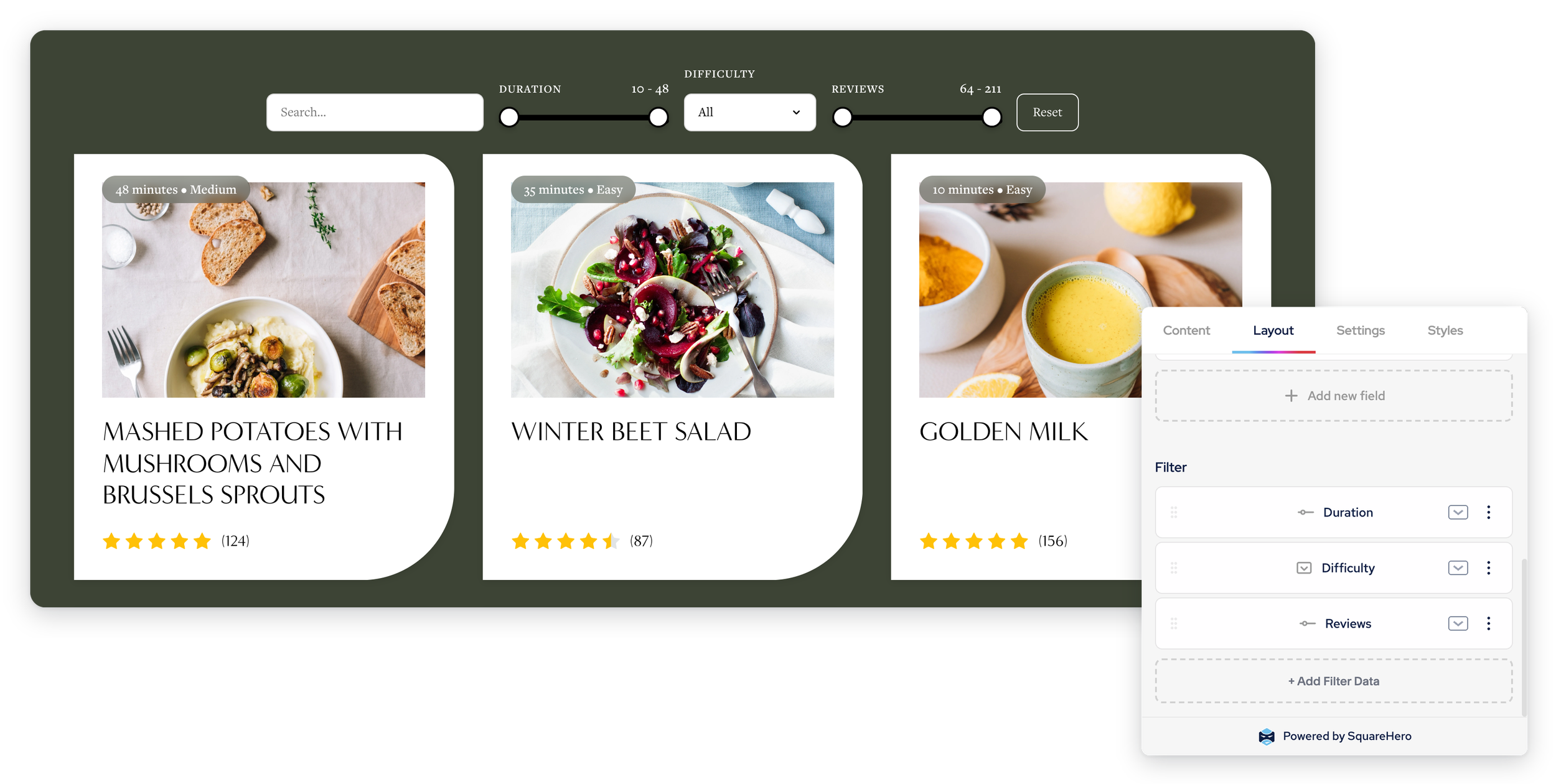
Custom Fields in SquareHero Studio
SquareHero Studio adds custom fields to your Squarespace content and puts them into the editing experience, rather than leaving your client to manage a custom code solution.
You can create fields for the information your particular website needs, including different field types depending on what you're storing.
For example, a recipe collection could have:
Duration
45 minutes
Difficulty
Easy
Rating
5 stars
Reviews
12
Those fields become part of the content your client is managing.
There's no separate code block they need to understand and no hidden system you've built that they need to remember how to use.
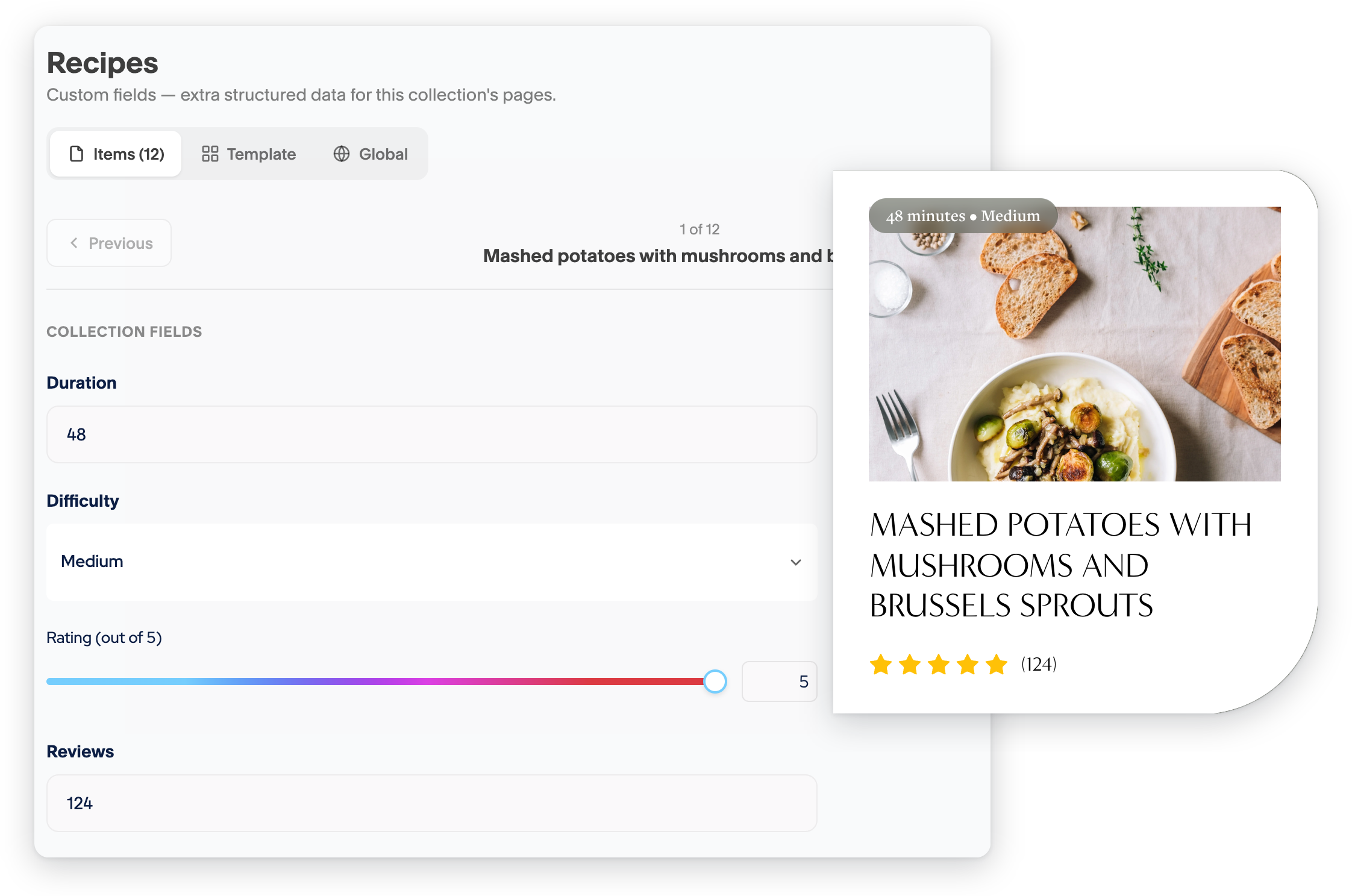
Build custom. Hand over simply.
This is a big part of how we think about SquareHero Studio.
AI and custom code have made it easier than ever to build things that Squarespace doesn't natively provide.
But being able to build something isn't the same as building something that's good to hand over.
For a client website, the editing experience matters just as much as the front end.
SquareHero Studio is designed to give you the freedom to build more sophisticated Squarespace websites while keeping those websites manageable for the people who have to edit them.
Custom fields don't have to mean complicated websites
Adding structured content doesn't mean your website needs to become complicated.
In fact, the opposite can be true.
When the content is structured properly, your client can manage individual pieces of information without needing to understand how the website itself is built.
You can have a recipe with a Duration field, for example, rather than asking your client to remember that "45 minutes" needs to go at the end of the description in a particular format.
The website handles how that information is displayed.
The client just needs to enter the information.
That's a much nicer relationship between the content and the design.
What could you build with custom fields?
Once you start thinking in terms of structured content, there are loads of possibilities.
Recipes
Duration, difficulty, rating, servings, dietary information and more.
Portfolios
Client, location, service, year, industry or project type.
Testimonials
Customer name, company, role, rating, photo and other information.
Team members
Role, location, department, social links and other profile information.
Case studies
Industry, services, project year, results, technologies or other project details.
The possibilities are really only limited by the content you're trying to manage.
Custom fields become even more useful with other SquareHero Studio features
A custom field on its own is useful.
But where things get really interesting is when you start using that structured content elsewhere on your site.
For example, you could create a recipe collection with custom fields for:
Duration
Difficulty
Rating
Servings
Then use those fields in a SquareHero Studio Cards block to create a completely custom recipe grid.
You could also use that information to create filtering controls.
Suddenly you've gone from a standard Squarespace collection to something that feels much more like a purpose-built content system.
And the person managing the website is still just updating the content.
Build more. Break less.
There's always going to be a place for custom code.
AI has made it an incredibly powerful tool, and sometimes it's exactly the right way to solve a problem.
But every time you add custom code to a client website, it's worth asking:
Who is going to maintain this?
And:
What happens when I'm not around?
That's one of the things we think about when building SquareHero Studio.
The goal isn't to stop designers from building custom websites.
It's to give them better tools for doing it.
Tools that let you build sophisticated layouts and content systems while keeping the editing experience familiar and manageable for the client.
Because a website shouldn't just be impressive when you launch it.
It should still be a good website to own a year later.
Add custom fields to Squarespace with SquareHero Studio
SquareHero Studio adds custom fields, custom collections, advanced Cards and other tools to your Squarespace workflow.
It's built for Squarespace designers who want to push the platform further without leaving their clients with a website that only the original developer knows how to use.
Looks custom. Edits like Squarespace.